



ClevGuard Support: Monitor Devices with Others' Permission.
Wondering who viewed your Snapchat profile? Snapchat does not show a list of profile visitors. It does show Story viewers while that viewer list is available, and Public Profile Insights may provide aggregate engagement data. This guide explains what a Snapchat profile viewer can and cannot reveal, compares three Story-viewing options, and covers safer ways to view public content. It also explains why no legitimate tool can bypass a private Story or reveal a hidden list of profile viewers.
Table of Contents
Part 1: Top 3 Snapchat Profile and Story Viewers
Here are the top three Snapchat Profile viewer tools making waves in 2026. Each one brings unique features, so you can pick what suits your needs best.
1 KidsGuard for Snapchat
KidsGuard for Snapchat is the best choice for those who want a more comprehensive Snapchat story and profile viewer. ts listed features include reading conversations, viewing Story updates, recovering disappearing messages, and downloading snaps. Use it only on a child's device you are legally permitted to monitor, and follow applicable consent and privacy laws.
To get started with KidsGuard for Snapchat, you will need physical access to the target device for initial setup. This is essential to install the app and configure it properly. Once installed, the app runs discreetlyin the background, collecting data and sending it securely to your online dashboard.
How to Use KidsGuard for Snapchat:
1. Sign up for a ClevGuard account and purchase a monitoring plan.
Click "Sign Up/In" to create a ClevGuard account and log in to the KidsGuard for Snapchat website. Choose "Monitor Now" to get a KidsGuard for Snapchat plan at the pricing page.

2. Install the app on the authorized device.
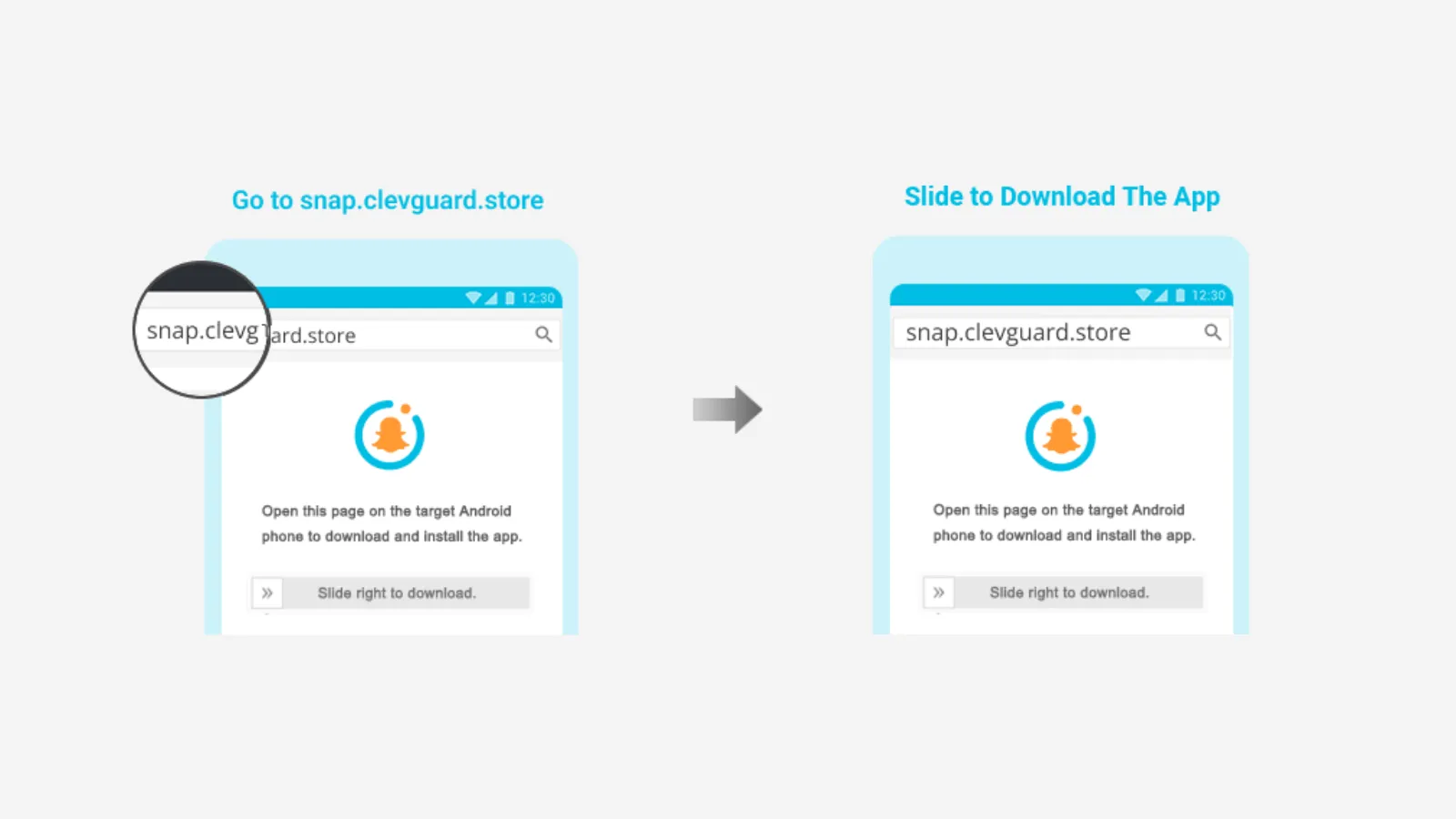
Get the target device for several minutes to complete the configuration. Visit https://www.installapk.net/ on the target device's browser. Follow the instructions to install and set up KidsGuard for Snapchat.
3. Complete the setup and verify your account.
To bind the target device to your online account, click "Verify Setup" and ensure the configurations are finished.
again.
4. Start monitoring Snapchat activity from your dashboard.
After that, you'll be brought to a monitoring dashboard where it will start collecting Snapchat data. Choose "Snap & Stories," and you can view someone's private and public stories secretly.

Key Features of KidsGuard for Snapchat
- Monitors Snapchat chats, snaps, and stories in real-time.
- Recover disappearing messages, photos, and videos.
- Easy-to-use dashboard for tracking all activities.
- Works discreetly in the background.
- Provides detailed analytics and viewing history.
With KidsGuard for Snapchat, you can get a clearer picture of Snapchat interactions, though it's mainly designed for parental control. If you're wondering, does Snapchat Plus show who viewed your profile? KidsGuard for Snapchat offers more monitoring features than Snapchat Plus itself.
2 Storyclone: Snapchat Story Downloader Viewer

Storyclone is presented as a viewer and downloader for publicly available Snapchat Stories. It does not provide legitimate access to private Stories. Check the service's current availability, supported accounts, and privacy terms before using it.
Key Features of Storyclone:
- View Snapchat stories anonymously
- Download stories for offline viewing
- No need to log in or create an account
- Works on both desktop and mobile devices
How to Use Storyclone:
- Visit the Storyclone website.
- Enter the Snapchat username you want to view.
- Click 'Search' and wait for the stories to load.
- Watch or download the stories as you like.
This tool is perfect if you want to see stories without leaving a trace. It's user-friendly and doesn't require any complicated setup.
3 Snaplytics: Snapchat Stories Download & Viewer

Snaplytics stands out as a Snapchat Profile viewer because it offers more than just story viewing. It's also a great tool for downloading and analyzing Snapchat stories.
Key Features Snaplytics:
- Download and view public Snapchat stories
- Analyze story engagement and reach
- No account needed for basic viewing
- Supports multiple devices
How to Use Snaplytics:
- Go to the Snaplytics website.
- Input the username of the profile you want to check.
- Browse available stories and download if needed.
Snaplytics is ideal for those who want to track story performance or simply keep a record of favorite snaps. It's reliable and easy to navigate.
Part 2: Alternative Ways to See Someone's Snapchat Profile and Story Secretly
If you're curious about how to see someone's profile or story without them knowing, you're not alone. Many Snapchat users want to explore stories and profiles anonymously. Here's a step-by-step list to guide you through the most popular and effective methods in 2026:
1. Turn On Airplane Mode Before Viewing the Story
- Open Snapchat and let the Stories load (don't open them yet).
- Turn on Airplane Mode to disconnect from the internet.
- Open and view the Story.
- Close Snapchat completely — force quit the app.
- Turn off Airplane Mode and reconnect to the internet.
2. Use Half Swipe to Preview Chat Content
- Locate the chat in your Snapchat inbox.
- Slowly swipe right (but not fully open) to preview the message or Snap.
- Don't release the swipe — once you let go, the message remains "unseen."
3. Use a Secondary Snapchat Account
- Create a new Snapchat account using a different email/number.
- Add the person you want to observe.
- If their Story is set to public or they accept your request, you'll be able to view it without them knowing who you are.
4. Borrow a Friend's Account (With Permission)
If a mutual friend has access to the target's Snapchat, you can view Stories or profile content through their account.
Here's how:
- Ask the friend if they're okay with you checking something on their Snapchat.
- Use their device to view the content anonymously.
- Make sure not to interact or send messages that could reveal your identity.
Part 3: FAQs about Snapchat Profile Viewer
When it comes to the Snapchat Profile viewer, there are always questions. Let's tackle the most common ones so you can use these tools with confidence.
Q1: Can You See Who Viewed Your Snapchat Profile?
No. Snapchat does not provide a list of people who visited your profile. Story viewing is different: Snapchat can show which accounts viewed a Story while the viewer list is available, and Public Profile Insights may show aggregate metrics. Third-party “profile viewer” tools cannot legitimately reveal a hidden visitor list.
Q2: How to Download Someone's Snapchat Profile Picture?
If you want to save someone's profile picture, you can use a Snapchat Profile viewer tool or screenshot the image. Some apps and online platforms let you enter a username and download the profile picture directly. Always remember to respect privacy and use these features responsibly.
Q3: Can You View Someone's Private Snapchat Story?
Only accounts selected by the Story creator can view a private Snapchat Story. A legitimate profile or Story viewer cannot bypass that setting. The appropriate way to gain access is to ask the creator to add your account.
Bonus: Extra Tips for Snapchat Profile Viewing
While using a Snapchat Profile viewer can be exciting, always keep these tips in mind:
- Stick to reputable tools to avoid scams or malware.
- Never share your Snapchat password with third-party apps.
- Respect other people's privacy and only view public content.
- Regularly check Snapchat's privacy settings for updates.
If you're curious about does Snapchat Plus show who viewed your profile, know that Snapchat Plus offers extra features, but it doesn't reveal profile viewers. It might give you more analytics, but not specific names.
Conclusion
Curiosity about who views your Snapchat is natural, and with the right Snapchat Profile viewer tools, you can explore public stories and profiles more freely. While Snapchat keeps some things private, tools like KidsGuard for Snapchat, Storyclone, and Snaplytics offer new ways to see and save content.

