



ClevGuard Support: Monitor Devices with Others' Permission.
If you’ve used ClevGuard products before — especially tools like KidsGuard Pro — you probably know us as a brand focused on digital safety and family tech solutions. Many long-time users trust ClevGuard for monitoring, protection, and smart online management.
But as AI continues to reshape how we create and communicate, we wanted to bring something new, fun, and genuinely useful to both creators and families. That’s why we launched ClevGuard AI Video — an easy, fast, and beginner-friendly way to turn ideas into high-quality AI videos and images.
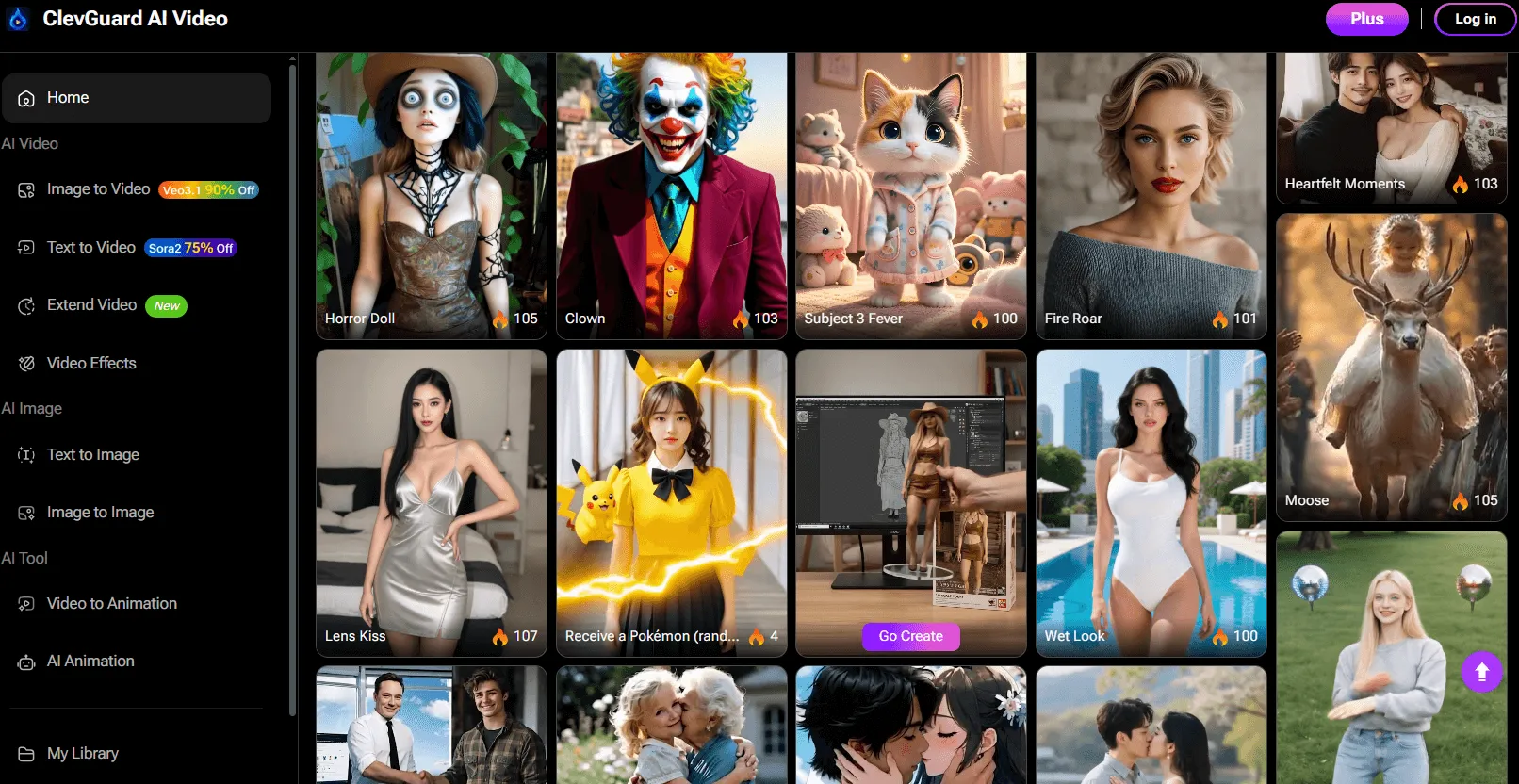
AI video generation isn’t just for artists or content creators. It can bring a little extra fun into your daily life — making cute family clips, animating your kids’ drawings, turning travel photos into dynamic videos, or even helping parents create simple educational content at home. And of course, it’s great for entertainment when you just want to explore your creativity.
In this guide, we’ll walk you through everything ClevGuard AI Video can do and show you how to use it step-by-step, so you can start generating videos in minutes — no editing experience needed.
Table of Contents
Part 1: What Can ClevGuard AI Video Do?
ClevGuard AI Video is designed as an all-in-one creative suite powered by advanced AI models. It covers both AI video generation and AI image generation, plus several smart tools to enhance or transform your content.
1 AI Video Tools
These features help you generate or upgrade videos using AI:

Image to Video: Turn a single picture into a moving, dynamic video. Perfect for portraits, character images, product shots, and creative concepts.
Text to Video: Give the AI a short prompt, and it instantly turns it into a complete video scene with motion and style.
Video to Video Converter: Upload a video and transform it into a new style — such as anime, 3D, cinematic, or cartoon.
AI Video Effects: Enhance your clips with smart effects like motion smoothing, color upgrade, stylized filters, or AI-powered scene adjustments.
Video to Animation: Turn real-life footage into animated content like anime, cartoon, or sketch-style visuals.
AI Extend Video: Extend the duration of your video smoothly without breaking the scene, perfect for looping or creating longer story flow.
AI Video Templates: Pick a template and generate a full video instantly. Ideal for beginners or quick content creation.
2 AI Image Tools
These features of ClevGuard AI Video help you create high-quality images compatible with video generation:

Text to Image: Type your idea and let the AI turn it into a crisp, creative image.
Image to Image: Upload a photo and remake it in different styles: anime, 3D, watercolor, realistic, and more.
3 AI Animation Tools
For users who want animated visuals, ClevGuard AI Video can make these for you:
AI Animation Generator: Create animated movements or stylized visuals from text, images, or simple ideas.
AI Anime: Turn characters, selfies, or objects into anime-style videos or images.
Part 2: How to Use ClevGuard AI Video
Using ClevGuard AI Video is simple, even if you’ve never edited a video before. Below is a general workflow you can follow, regardless of which tool you want to use.
Step 1.Go to ClevGuard AI Video Website
Open your browser and visit the official ClevGuard AI Video platform. You don’t need to install anything — everything works online.

Step 2.Choose the Feature You Want
Select one of the tools such as:
- Image to Video
- Text to Video
- Video to Video
- AI Animation
- Video Effects
- Extend Video
- Templates
Each tool has a simple interface with quick instructions.

Step 3.Upload Your File or Enter a Prompt
Depending on the feature:
- Text to Video → enter your idea or scene description
- Image to Video / Image to Image → upload your image
- Video to Video / Video to Animation / Video Effects → upload your video clip
You can also choose the output style, aspect ratio, or quality settings.

Step 4.Customize Your Output (Optional)

You can adjust:
- Style (anime, realistic, cinematic, cartoon, etc.)
- Movement intensity
- Rendering speed
- Additional effects
This step is optional — beginners can simply use default presets.
Step 5.Click Generate
The AI will start creating your video. Most results take just a few seconds to complete.
Step 6.Preview and Download
Watch the preview. If you’re satisfied, download your video in high quality — watermark-free for premium users.
That’s it! You’ve created your first AI-powered video using ClevGuard AI Video.
Conclusion
ClevGuard AI Video makes advanced video creation accessible to everyone — especially young creators, social media users, and anyone who wants to turn ideas into visuals quickly. With tools like image to video, text to video, video to animation, and powerful AI video effects, you can create standout content without learning complicated software.
If you want fast, easy, and creative AI video generation, ClevGuard AI Video is a great place to start. Try it once, and you’ll see how effortless video creation can be.

