



ClevGuard Support: Monitor Devices with Others' Permission.
Have you scroll-stopped a TikTok video that quickly zooms out of the character at warp speed, finally revealing the entire planet? That’s the Earth zoom-out effect, which seems cut out of a high-budget Hollywood movie. But the secret is, you don’t need Hollywood-level tools or editing skills to create such a video. Many AI tools can add a stunning video effect with a few clicks.
This post details why the zoom-out effect is so appealing to creators. Also, it guides you through creating a viral AI Earth zoom-out effect using a powerful yet easy-to-use AI platform, so you can create one of your own!
Table of Contents
Part 1: How to Create a Viral AI Earth Zoom Effect?
Part 2: Why Earth Zoom Out Effect Popular Today?
Part 3: Conclusion
Part 1. How to Create a Viral AI Earth Zoom Effect?

The viral AI Earth zoom-out effect is a breathtaking technique that starts with a character and zooms out at warp speed all the way into deep space. Provided you use a reliable, powerful tool like Monimaster Video to create the transition, it will instantly hook your viewers. Using the Monimaster Video is exceptionally straightforward, and it produces a cinematic, high-quality zoom-out effect in no time. Best of all, it gives out 20 free credits when you sign up for a new account, so follow the steps to create a professional-looking video:
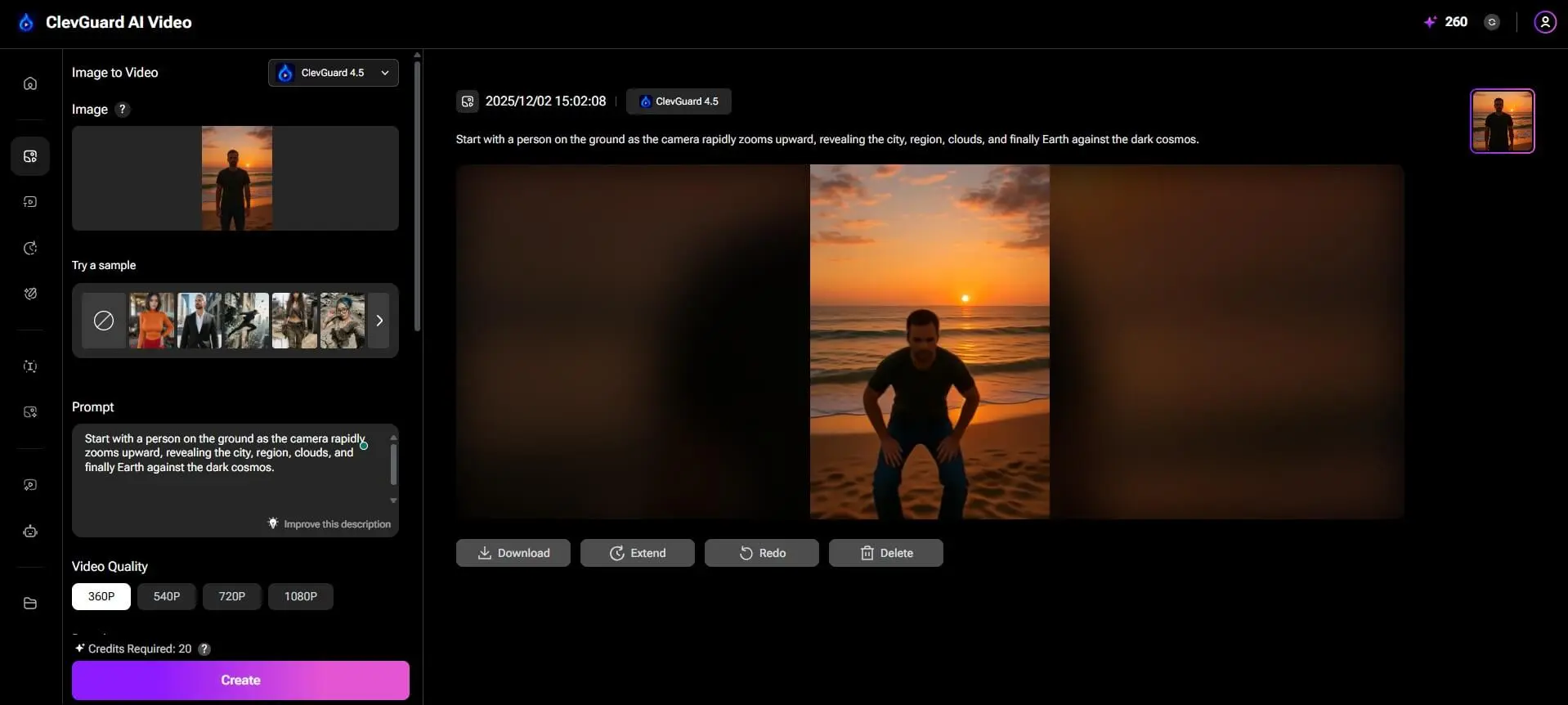
Step 1. Head over to the Image to Video option in the left menu bar of the Monimaster Video dashboard.

Step 2. Click on Click to Upload in the Image section to upload the image you want to add an effect to, where Earth zooms out to the universe.

Step 3. As the image upload is complete, head over to the Prompt section and write a text description for the image like this: Start with a person on the ground as the camera rapidly zooms upward, revealing the city, region, clouds, and finally Earth against the dark cosmos.

Other example prompts that you can use are:
- The person posing for the photo, the camera slowly zooms out to reveal the surrounding landscape, then the continent, and finally shows the entire Earth from space.
- If you’re using a vehicle image, the prompt can be “A parked sports car on the road, as the camera gradually pulls away to show the surrounding landscape, mountains, and eventually the Earth from space. Maintain realistic lighting and smooth motion.”
- Show a drone-level view above a forest, then zoom out until the continent and the entire Earth come into view.
Step 4. To customize the video, you can select from the available Video Quality options and their duration. You can also add Style, Lip Sync, and Auto Sound from the Advanced Settings option. Once you’re satisfied, click Create to generate an Earth zoom-out video.

Step 5.Monimaster Video takes a few seconds to generate the output. Once done, click the Download option to save the video.
Part 2. Why Earth Zoom Out Effect Popular Today?
The simple answer is: the Earth zoom-out effect looks cool. The cinematic, AI-powered transition adds a dramatic flair and can create a sense of awe amongst your audiences. This can be suitable for travel creators, vloggers, or general creators who love jumping into the latest trends. Here’s why the effect is popular on Instagram Reels and TikTok:
Instant Viewer Hook: The dramatic shift from a close-up to a cosmic view delivers a strong sense of perspective and scale. Also, starting a video with the effect creates a “wow” moment amongst the audience.
Versatility: The live Earth zoom-out effect can be an ideal way to start a travel blog or gaming video, and even create funny spoof videos. This trick instantly imbues your narrative with a sense of grandeur and adventure.
Storytelling: The zoom-out effect adds depth to a video and can make even boring scenes epic and engaging. Besides, it goes well with the short-form content on Instagram, TikTok, and YouTube Shorts.
Easy to Create: Modern AI-powered tools like ClevGuard AI Video make it simple to add such a video effect with a few clicks. This makes it accessible even for beginners with little to no editing skills.
Viral Social Media Clips: As it’s a trendy effect, creators can use it to create viral content and stay relevant on social media.
Conclusion
The Earth zoom-out effect is no longer something you see in movies, but you can easily create one using AI. Although many tools offer the said feature, many fail to make a smooth transition or maintain consistent lighting, resulting in glitches. So, select simple-to-use yet powerful AI tools, such as Monimaster Video. It’s free to try and requires no technical skills. Just upload the image, write a descriptive prompt, and you have your cinematic video within seconds. Not only that, Monimaster Video offers a wide selection of trendy video filters and effects to try. So, join the trend and create an amazing Earth zoom-out video!

