



ClevGuard Support: Monitor Devices with Others' Permission.
Want to convert your 2D artwork into a stunning 3D visual, but don’t have the skills to pull it off? No stress, as modern AI 2D to 3D image converters can make the whole process effortless. All you need to do is upload the artwork and let AI perform its magic. The best 2D to 3D image converters precisely analyze the original image and its visual elements like lighting, textures, and shadows to add depth and dimension, and create a 3D effect.
However, most 2D to 3D image generators don’t deliver what they claim to. So, avoid the hassle of experimenting with random tools and jump straight into this guide on the best AI image converters!
Table of Contents
Part 1. Best 2D to 3D Image Converters You Can Try
Although AI makes it easy to convert a 2D picture into a 3D model, many tools can distort details or produce incomplete results. This is why selecting the best tools matters, and here is the list of curated options:
1Meshy AI

Site: https://www.meshy.ai/
Meshy AI is a powerful tool that transforms text and images into detailed 3D models and textures within minutes. While it’s fast, its support for various art styles and intuitive interface make Meshy AI suitable for a wide range of users, from professionals to hobbyists. Not only that, its multi-view feature ensures consistent results every time. Here, you can upload up to 3 images of your object from different angles, and the AI analyzes each perspective to generate a detailed output.
Key Features
- Text-to-3D: Generate detailed 3D models from text descriptions, so users can be creative without prior experience.
- AI Texturing: Meshy AI can create high-quality 3D textures using text prompts or concept art.
- Diverse Art Styles: Rich in different art styles, from voxel to photorealistic, to cater to various user needs.
- Multilingual Support: You can write the text prompts in your native language, making the tool accessible worldwide.
Pricing
Free
Pro (billed annually): $15.17/month
Studio (billed annually): $48/seat/month
Export Formats: fbx, obj, glb, usdz, stl, blend, 3mf
2Dzine AI

Site: https://www.dzine.ai/tools/2d-to-3d-image-converter/
Dzine AI, unlike Meshy AI, is a comprehensive image generation and editing suite with an added ability to convert a photo to a 3D model. The interface is simple, and its advanced AI algorithms can work with any 2D images, such as sketches and photos, to generate high-quality outputs with multiple style variations. This makes the tool suitable for hobbyists, architects, 3D artists, and interior designers. The large number of features Dzine AI offers can be overwhelming, especially for beginners.
Key Features
- Diverse Input Support: Dzine AI supports uploading various 2D images, including portraits, product photos, characters, and even sketches.
- Customization Options: Users can select from multiple 3D styles or use text prompts to guide the conversion process and adjust texture, lighting, and composition.
- Multiple 3D Outputs: The 3D outputs are downloadable in multiple formats for added flexibility.
Pricing
Free
Beginner (billed annually): $7/month
Creator (billed annually): $16/month
Export Formats: glb, obj, fbx, and stl
3Tripo
Site: https://studio.tripo3d.ai/home
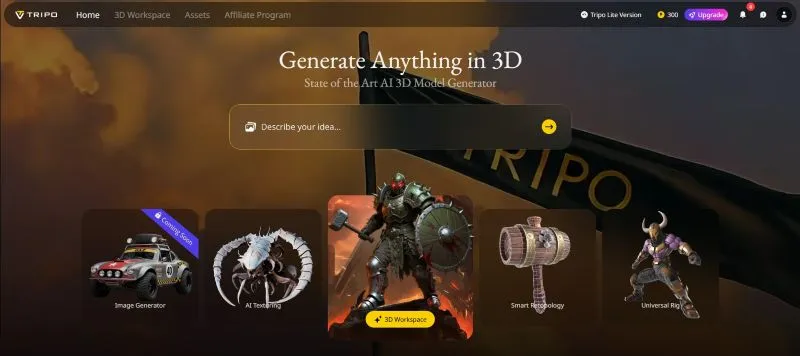
Tripo, like any 3D model generation AI platform, can turn your text prompts and images into 3D models via a web app, API, and plugins. The interface is simple, and the output is fast and of high quality, making it a great 2D to 3D Image converter.
However, unlike traditional tools, it prioritizes structure over surface-level texturing, primarily suitable for real-life applications. There are also a few optimization features, such as trimming unnecessary geometry and smoothing mesh flow, making Tripo ideal for prototyping, games, and personal projects. Tripo, however, lacks tools to refine the model's texture and final look.
Key Features
Unmatched Geometry: The 3D model Tripo generates has sharper edges, cleaner structures, and greater coherence.
Flexible Workflows: Tripo can transform text, images, or sketches into 3D models.
Advanced Customization: Its Smart Part Segmentation feature breaks down the complex model into editable parts. Also, auto-rigging and symmetry controls can transform a 3D model into a workable starting point for animation.
Pricing
Free
Professional (billed annually): $15.9/month
Advanced (billed annually): $39.9/month
Premium (billed annually): $111.9/month
Export Formats: usd, fbx, obj, stl, glb, 3mf
4Krea

Site: https://www.krea.ai/3d
Krea is more than a 2D to 3D image converter; its capabilities extend to enhancing and editing images and videos. It uses Latency Consistency Models (LCM) technology to render images under 50 milliseconds. It has a clean interface, so even beginners can generate a 3D model in no time. The output, however, isn’t suitable for video game assets or any practical use, but creators can use it for creating rough layouts or rapid prototyping.
Key Features
- Interactive Customization: Users can customize the generated outputs directly within Krea’s interface. This includes experimenting with textures, lighting, and multiple angles.
- Mesh Only Option: Krea lets you generate a 3D shape without a texture.
- AI Patterns: The tool lets you embed logos or text subliminally into images and create viral marketing campaigns.
Pricing
Free
Basic (billed annually): $8/month
Pro (billed annually): $28/month
Max (billed annually): $48/month
Export Formats: glb, obj, fbx, ply, stl
5HYPER3D

Site: https://hyper3d.ai/
If you’re a game developer, AR/VR creator, and animator who wishes to skip the tedious process of 3D modeling and need assets faster, HYPER3D can be a good pick. Even hobbyists and beginners can jump in to generate a clean, animation-ready 3D model, without any messy geometry or weird glitches.
Once the tool converts an image into a 3D model, you can export the output to popular formats like obj, fbx, and glb, which can be easily integrated with tools like Unreal, Blender, or Unity. All these features, however, come at a cost, which can be expensive for individual users and small teams.
Key Features
- High-Quality Texturing: HYPER3D uses AI to apply physically based rendering textures, so the character or object feels more realistic.
- Multi-Image Input: You can upload images of a character from multiple angles to create realistic 3D models.
- Input Flexibility: Users can use text prompts or images to generate a production-ready output for game engines and other software.
Pricing
Free
Creator (billed annually): $24/month
Business (billed annually): $96/month
Export Formats: obj, fbx, glb, usdz, stl
Part 2. How to Create 2D to 3D Video With AI?

Converting a 2D photo to a 3D video is simple with the Monimaster Video feature. Its powerful image-to-video converter lets you animate your favorite picture however you like. The best part is, you don’t need any specialized skills, and here are the steps:
Step 1.On ClevGuard AI’s dashboard, select Image to Video from the listed options in the left menu bar.

Step 2.Click on Click to Upload in the Image section to upload the picture to animate.

Step 3.As the image upload is complete, head over to the Prompt section and write a text description of your video. For example: “Make the dog run, with a flick of the wrist and a whisper of encouragement, as if calling forth a spirit from the wind.”

Step 4.Select the Video Quality (360p, 540p, 720p, or 1080p) and its Duration. You can head over to Advanced Settings to add Lip Sync, Style, and Auto Sound to your video. Then, click Create to have the AI transform your 2D image into a 3D video.

Step 5.It takes 15-20 seconds for ClevGuard AI Video to generate a video. Once done, click the Download option to save it.

Conclusion
As AIs advances, tools now create 3D models in just a few clicks. The best 2D to 3D image converters, like Meshy AI, Tripo, and HYPER3D, produce outputs that are even usable in gaming engines and other powerful software. You can also use Krea and Dzine AI to generate prototypes and, if needed, edit them with the available tools. However, if you need to animate your static image, Monimaster Video is a good option. The tool is simple to use and generates quality outputs in no time. It also offers plenty of video effects and filters to add life to your images!

